Guide
BothSync in HubSpot
Updated 14 October 2026
BothSync shows up in three places in HubSpot: its settings page, a card on your records, and three properties on each record that has a task.
The settings page
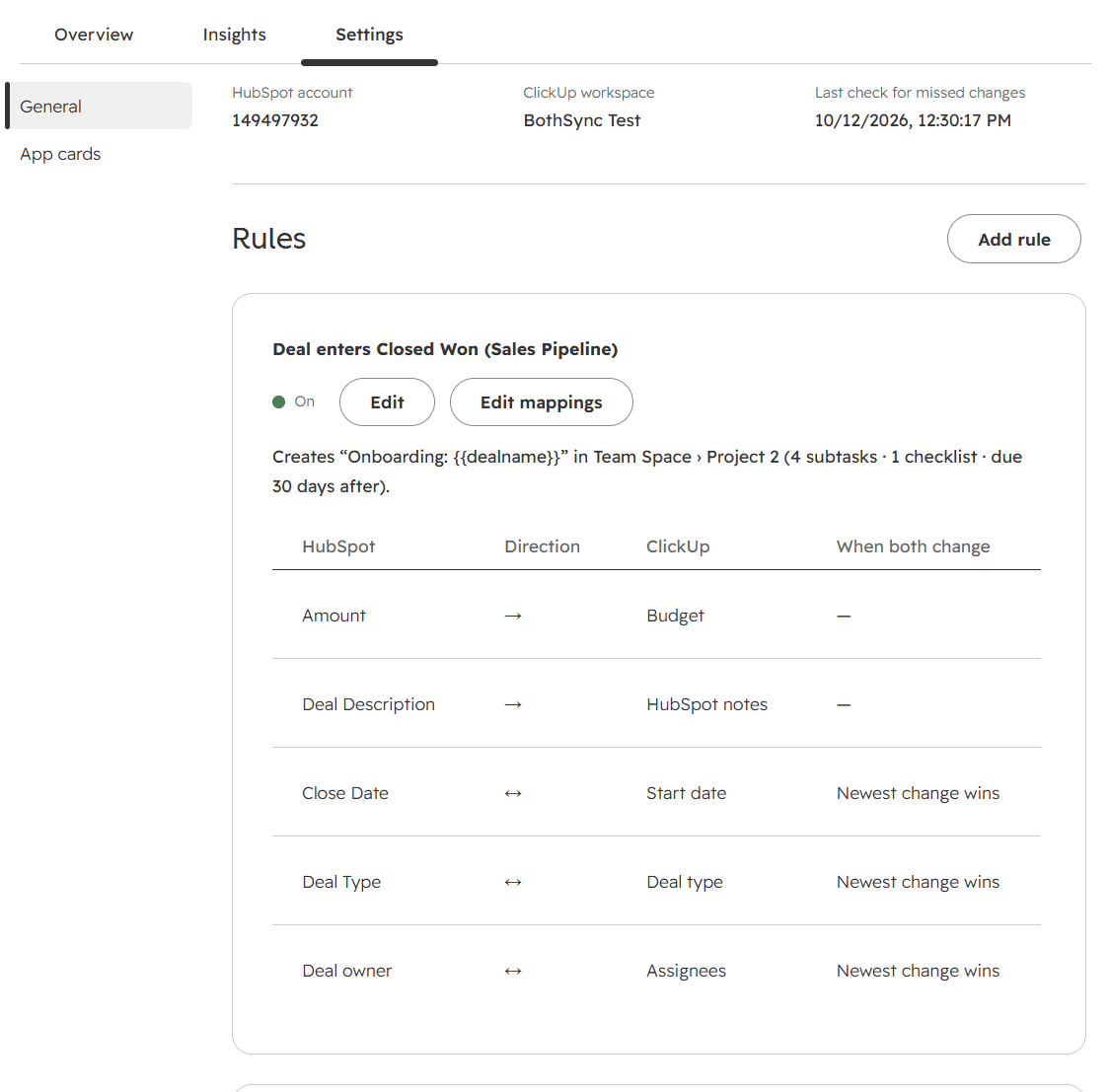
Open it from Settings (the gear icon) → Integrations → Connected Apps → BothSync → Settings, or from the BothSync settings link on any ClickUp card. From top to bottom it has:
- Connection: the HubSpot account, the connected ClickUp workspace, and when BothSync last checked for missed changes.
- Get started: the setup steps and which are done. It goes away once setup is complete.
- Rules: what starts work in ClickUp, with each rule’s task template and mappings. See Rules and task templates and Field mapping.
- People: who is a user in both HubSpot and ClickUp, matched by email address. Only those people can be assigned from the record owner, and become owners from the task’s assignees.
- Recent activity: the latest 30 things BothSync did, and anything it skipped. See Activity and troubleshooting.
- Uninstall: see Uninstall and your data.
The ClickUp card
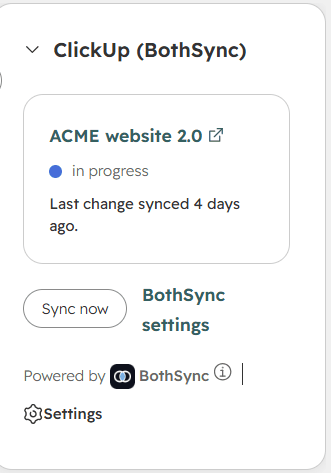
The ClickUp (BothSync) card shows a record’s ClickUp tasks on deals, tickets and companies. HubSpot does not place app cards by itself; Getting started shows how to add it. It shows in the record’s right sidebar.
For each task the card shows:
- the task’s name, which opens it in ClickUp;
- its status in ClickUp, in green once it is done;
- when a change was last synced.
A task that no longer syncs says why: Deleted in ClickUp (restore it from ClickUp’s trash to resume), Record deleted, or Merged away. See Deletes, restores and merges.
A record without a task says whether a rule would create one when the record reaches its stage.
Sync now
Sync now at the bottom of the card asks BothSync to check the record and its tasks straight away: whether a rule should create a task, and whether any mapped field or status is out of step. The card reloads after a few seconds with the result. The button shows while ClickUp is connected. You rarely need it, since changes sync by themselves, but it is handy right after changing a rule or a mapping.
Properties BothSync adds
BothSync adds three properties, in a property group called BothSync, to each kind of record your rules start from, and fills them on each record that has a task:
| Property | What it holds |
|---|---|
| ClickUp task | A link to the task in ClickUp. |
| ClickUp status | The task’s current status in ClickUp. |
| ClickUp last comment | The latest comment on the task, with its author. BothSync’s own notes are left out. |
Because they are ordinary HubSpot properties, you can use them in views, filters, reports and, on plans that have them, workflows: for example a view of won deals whose task is still “to do”. BothSync writes them, so leave them as they are: an edit in HubSpot is not sent to ClickUp. They cannot be used in field mappings.
If a record has tasks from more than one rule, the properties show the task that changed last.
On the record’s timeline
BothSync also adds what happens to the task to the record’s activity timeline, each entry with a link to the task:
- ClickUp task created, when a rule creates the task;
- ClickUp task status changed, with the status before and after;
- ClickUp task completed, when the task moves to a finished status;
- ClickUp comment added, for each comment, with its author. BothSync’s own notes are left out.
If a record shows none of them, open Activities on the record, then the Activity filter, and tick BothSync under Integrations.
Unlike the properties, the timeline keeps the whole history. Timeline entries need a permission BothSync has asked for since 14 October 2026. If you installed BothSync before then, install it again from the Getting started link to turn them on. Your rules and mappings stay as they are.